How to Check an Instagram Influencer’s Brand Deal History
An influencer’s previous brand partnerships can reveal valuable insights before you start a collaboration. This guide explains how to review sponsorship history, identify recurring partnerships, and evaluate brand fit.
.png)
How to Check an Instagram Influencer’s Past Brand Deals (3 Methods)
Before you brief a creator, send a contract, or wire a payment, you need to know three things: which brands they’ve already worked with, how frequently they post sponsored content, and whether any of those brands are your direct competitors. None of this information lives in one obvious place on Instagram.
This guide covers three methods for checking an Instagram influencer’s brand deal history — two manual approaches you can run without any tools, and one that gives you filtered, sortable deal history in a few clicks.
Quick answer: To check an influencer’s past brand deals on Instagram, search their profile for posts tagged #ad, #sponsored, or #partner; check their Tagged tab for brand-sourced campaign posts; and use Favikon’s Collaborations tab to view their full brand deal history filtered by recency and performance. The Collaborations tab is the only method that shows deals the influencer didn’t publicly disclose.
Method 1: Scan Their Instagram Profile Directly
The fastest manual check. Instagram requires disclosure for paid partnerships, so most sponsored content is labeled — but you have to know where to look.
Check for disclosure hashtags
On the creator’s profile, tap the search icon and filter their posts by hashtag. Search for:
• #ad, #advertisement
• #sponsored, #sponsoredpost
• #partner, #brandpartner, #collaboration
• Brand-specific tags like #[BrandName]partner or #[BrandName]ambassador
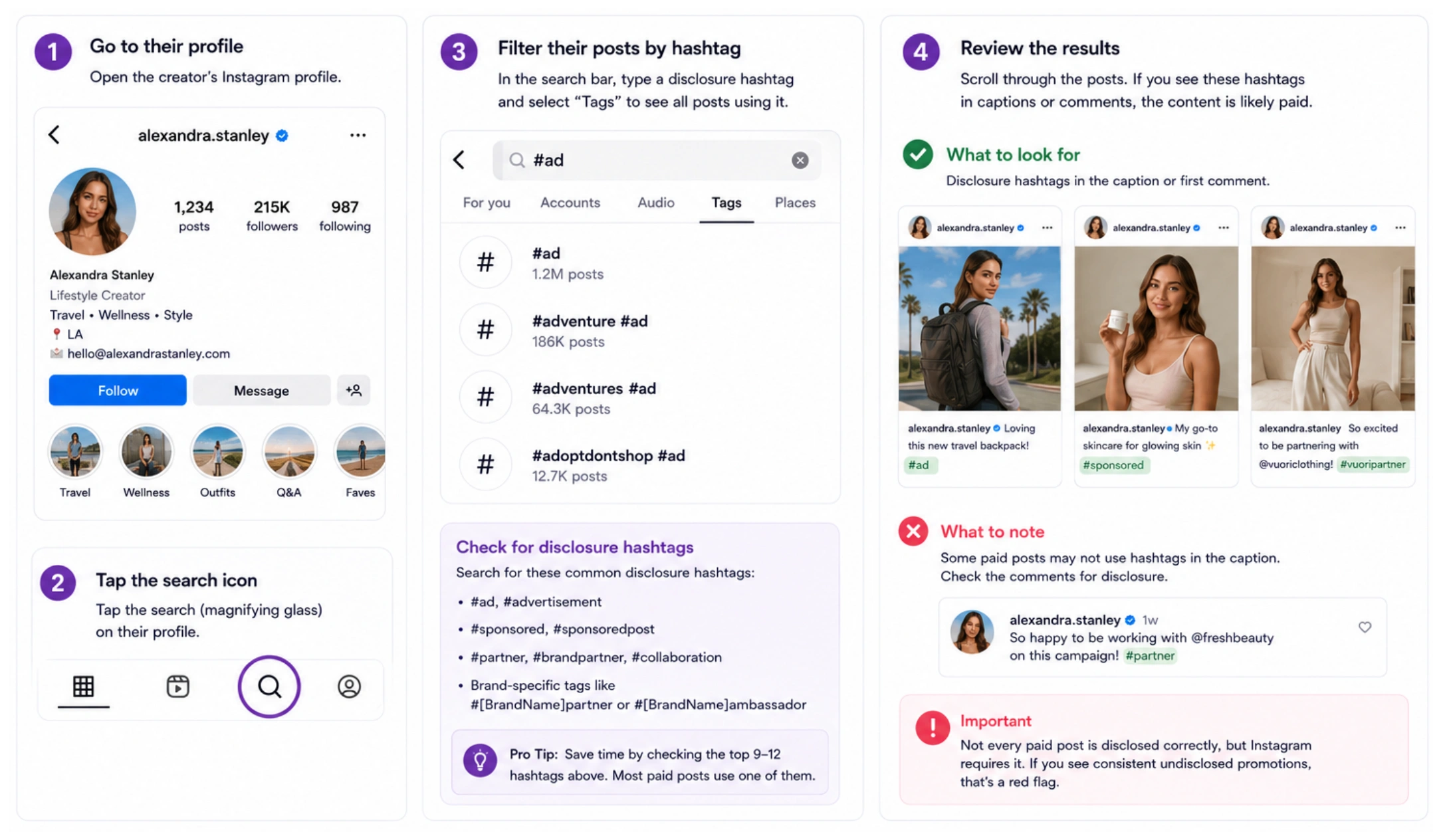
Most creators use at least one of these on paid posts. The volume and recency of results tells you how often they take deals and whether they’re active right now.
Check the “Paid partnership with” label
Instagram’s native paid partnership label appears directly below the creator’s name on feed posts and in the header of Stories. Scroll back through their recent posts and filter for this label. Not all creators use it, but when they do it’s the clearest disclosure signal available.
Check Story Highlights
Many creators maintain a permanent Highlight labeled “Collabs,” “Partners,” “Brand Deals,” or “Ads.” If it exists, it’s usually a curated collection of their most significant or ongoing partnerships. Worth checking before any other step — it takes ten seconds.
⚠️ Limitation: disclosure hashtags only surface content the creator chose to label. Undisclosed deals, gifted product posts, and affiliate arrangements without paid labels won’t appear. See Method 3 for coverage of deals the creator didn’t disclose themselves.
Method 2: Check Their Tagged Posts
This is the method most brand teams skip, and it’s often the most revealing one. When a brand runs a campaign with an influencer, the brand’s account frequently tags the creator in the campaign post — even when the creator doesn’t tag back or use disclosure hashtags in their own content.
How to check tagged posts on Instagram
1. Go to the creator’s Instagram profile.
2. Tap the Tagged tab (the icon with a person outline, to the right of their grid).
3. Scroll through the posts where they’ve been tagged. Campaign posts from brands appear here alongside organic tags from followers.
4. Look for posts published by brand accounts: they’ll typically use professional photography, campaign-style copy, and a product or service mention.
5. Note the brand name, approximate date, and whether it looks like a one-off or part of a recurring campaign.
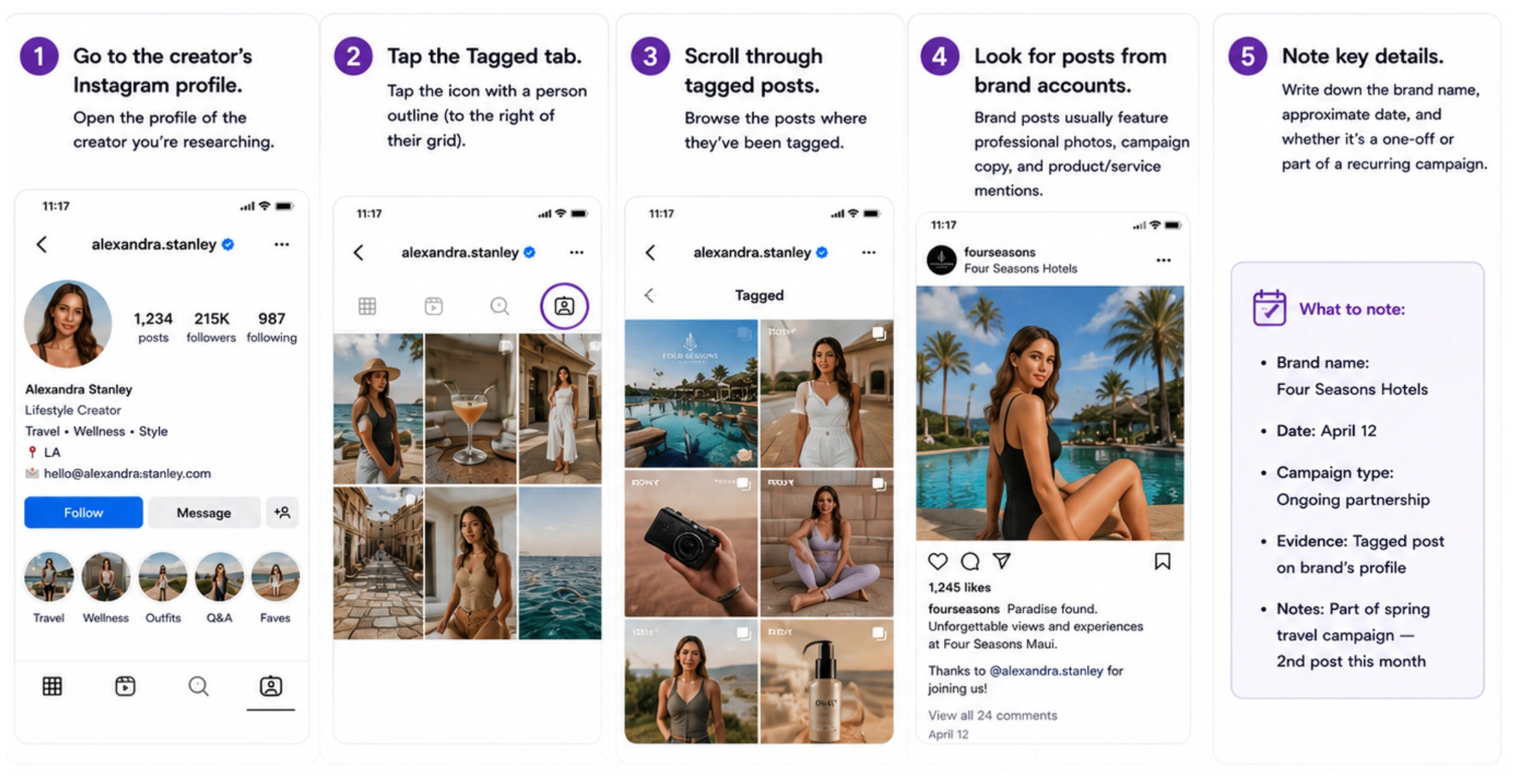
What this surfaces that hashtag searches miss: gifted product deals without formal disclosure, ambassador arrangements where the brand drives the content, and historical campaigns that the creator’s own profile no longer shows.
Pair this check with a fake follower check to ensure the audience engaging with these brand posts is genuine.
⚠️ Limitation: if the creator has set their tagged posts to private, this tab won’t be visible. Roughly 10–20% of professional creators restrict tagged content. If the tab is hidden, proceed to Method 3.
Method 3: Use Favikon’s Collaborations Tab
This is the most complete method. The Collaborations tab on a creator’s Favikon profile aggregates brand deal history from across their Instagram content — including posts the creator didn’t explicitly disclose — and makes it filterable by recency, frequency, and brand. It’s the step that turns a manual audit into a 2-minute check.
Step-by-step walkthrough
1. Go to Favikon and use Creator Search to find the influencer by name or handle.
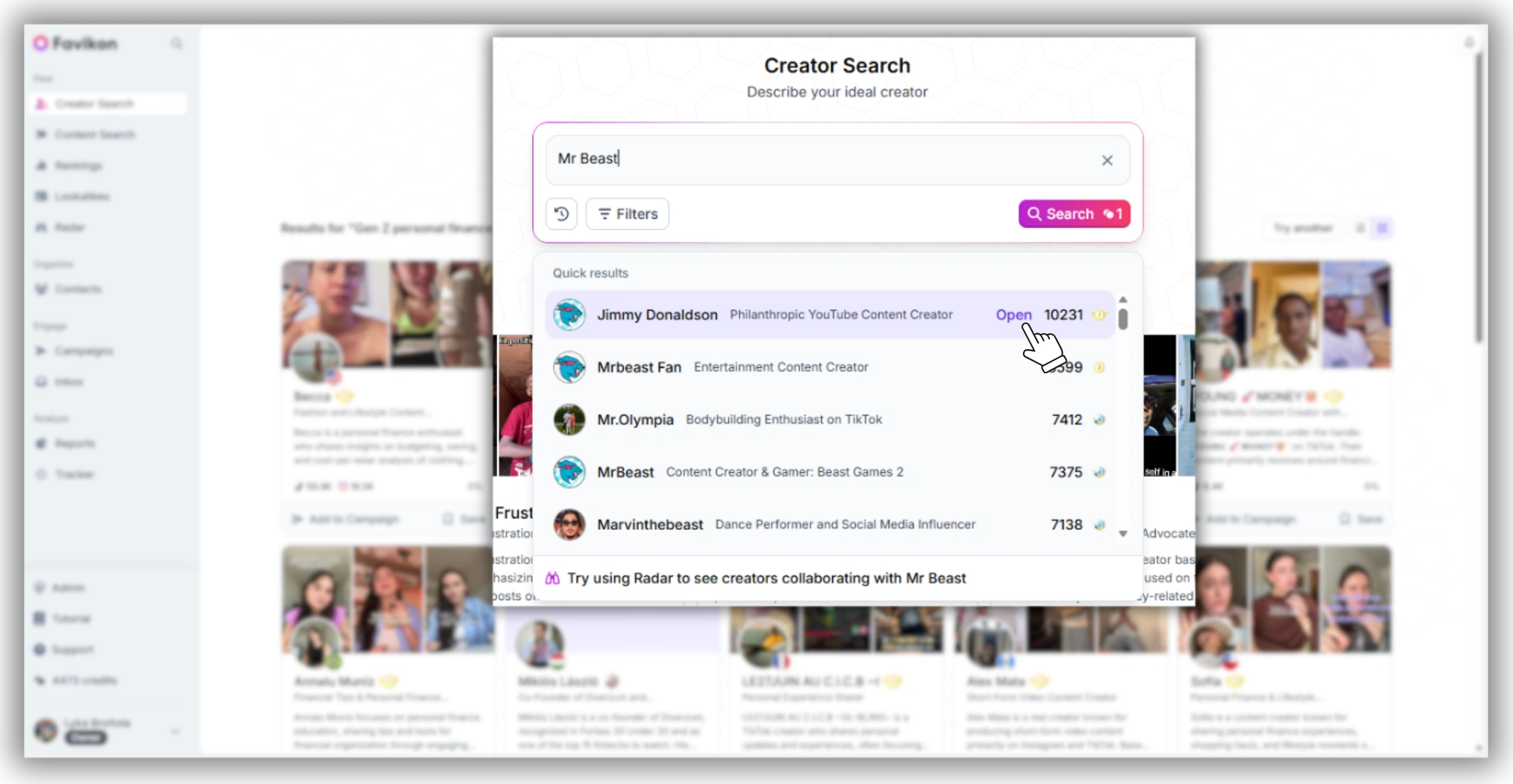
2. Click See full profile to open their Creator Profile.
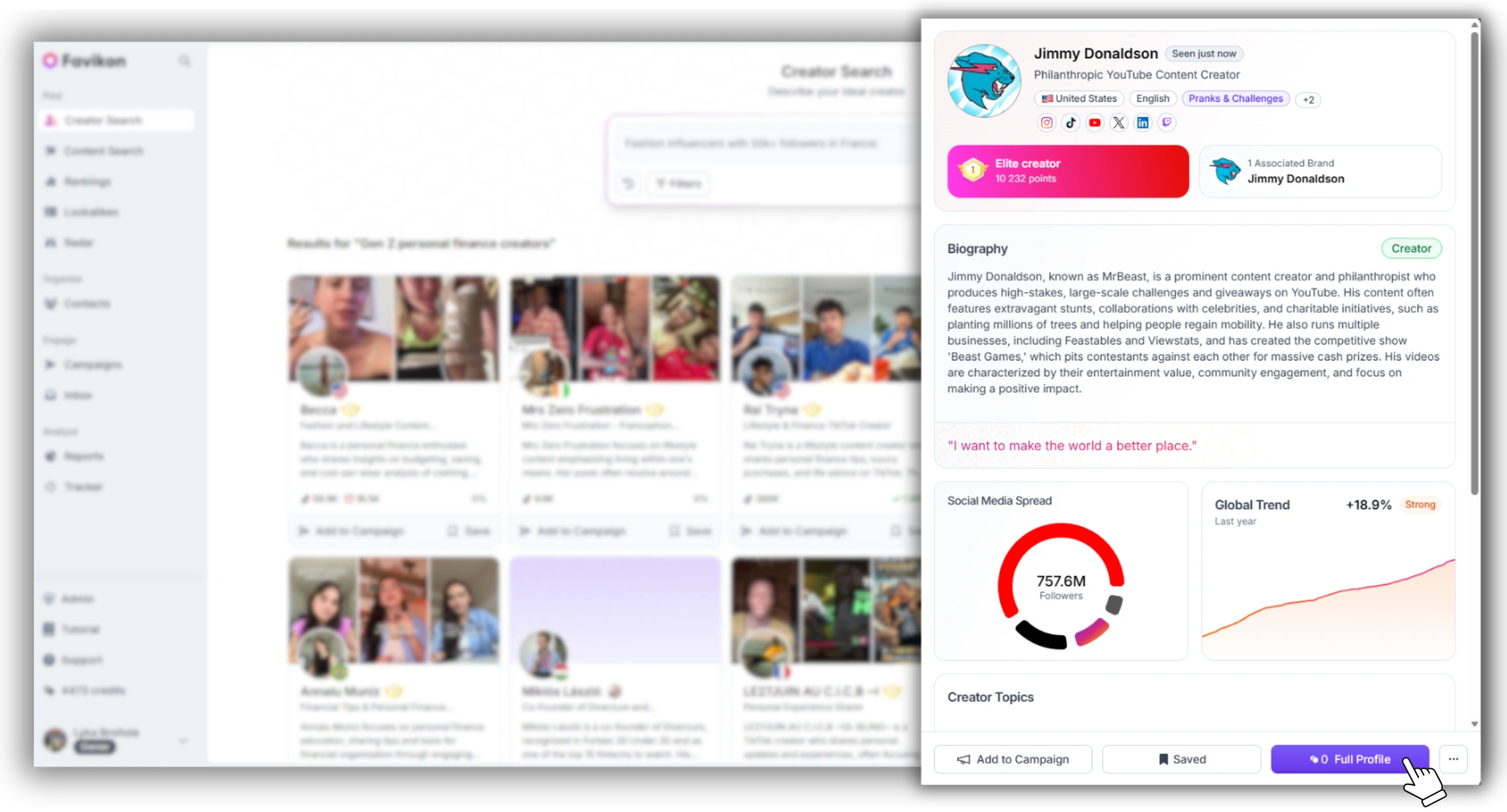
3. Navigate to the Collaborations tab. This shows a chronological list of brand collaboration posts — content where the creator appeared alongside or was tagged by a brand account.
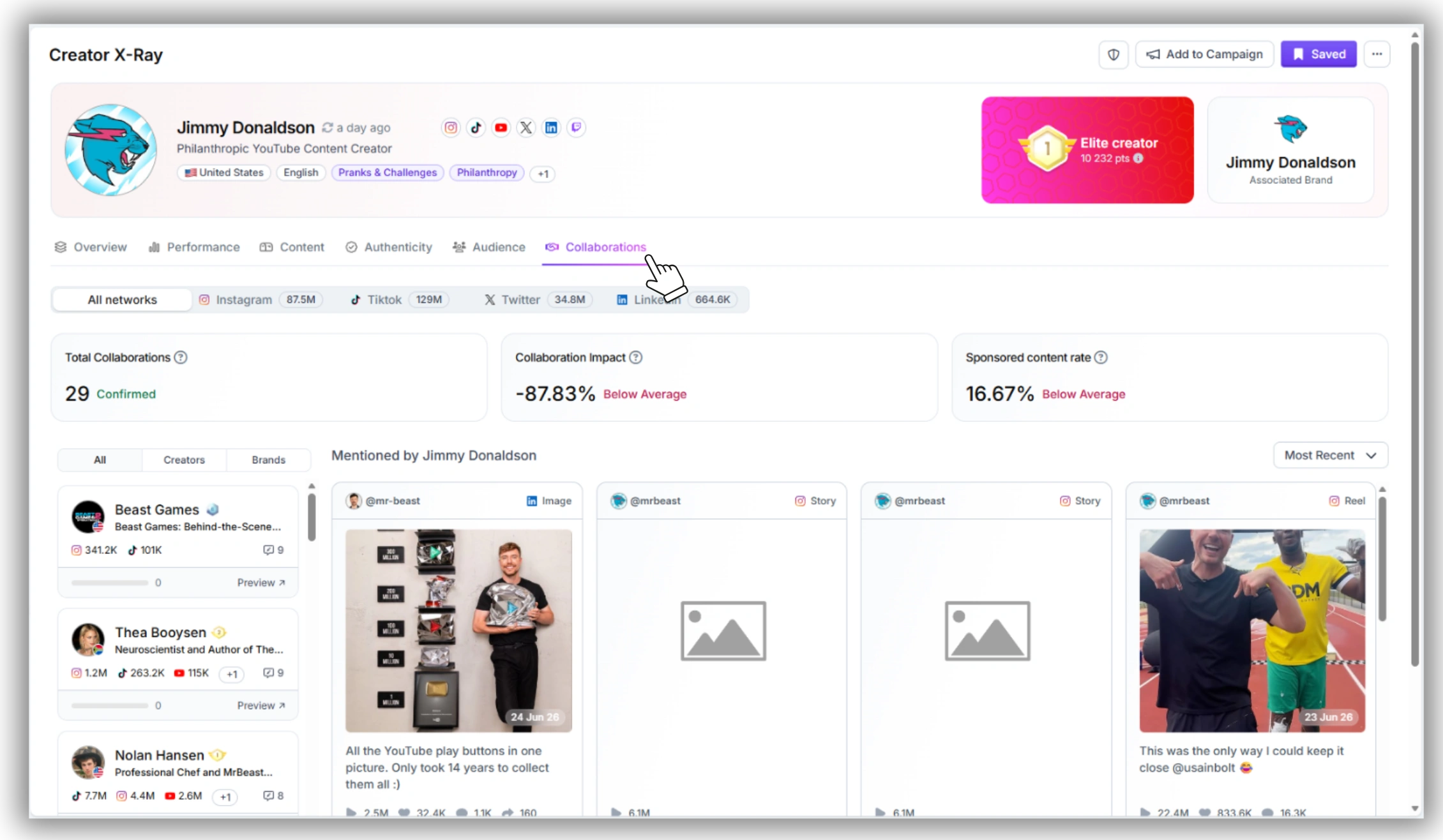
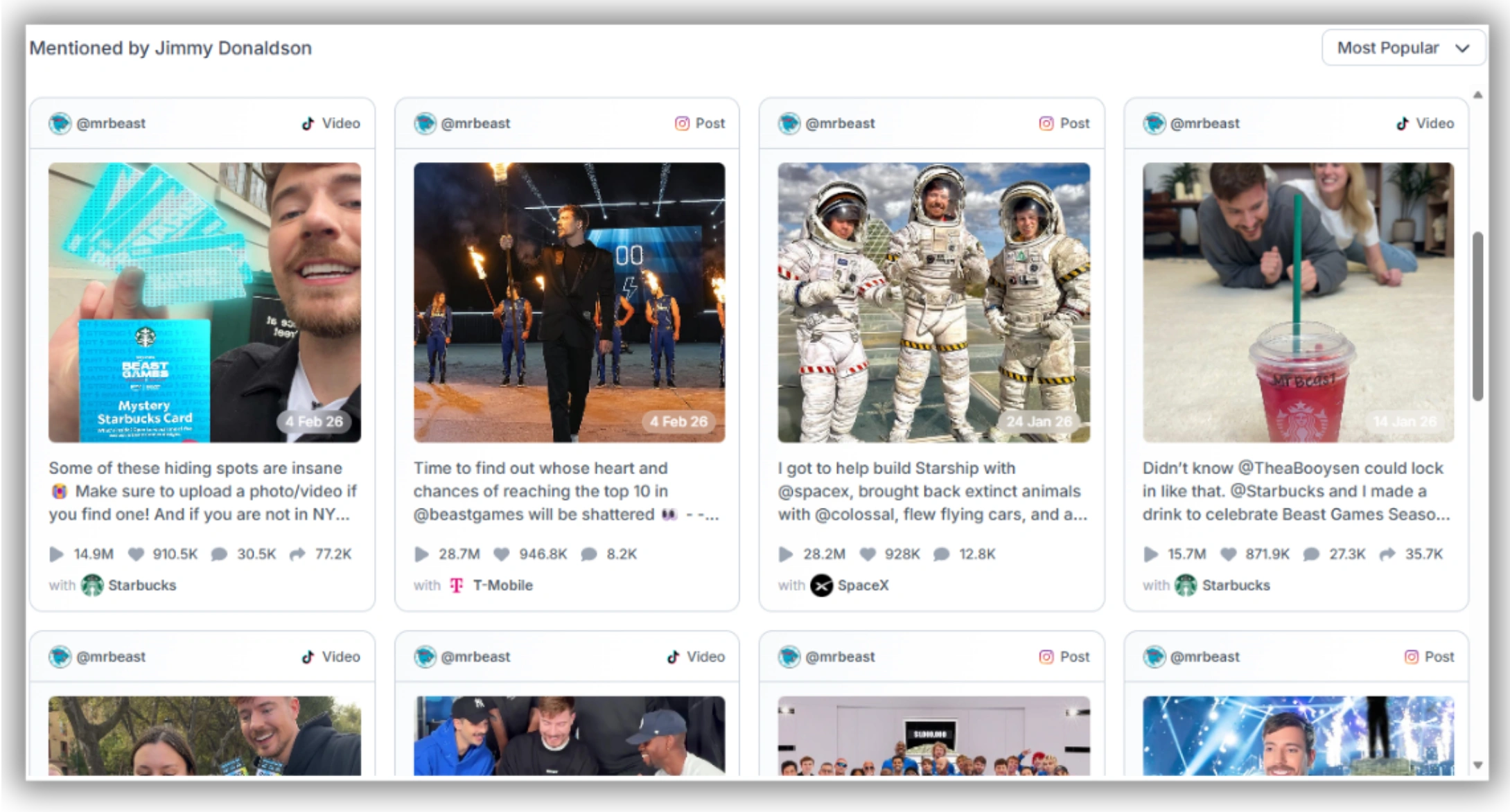
4. Filter by most recent to see their current active deals. Filter by most popular to see which brand partnerships drove the most engagement.
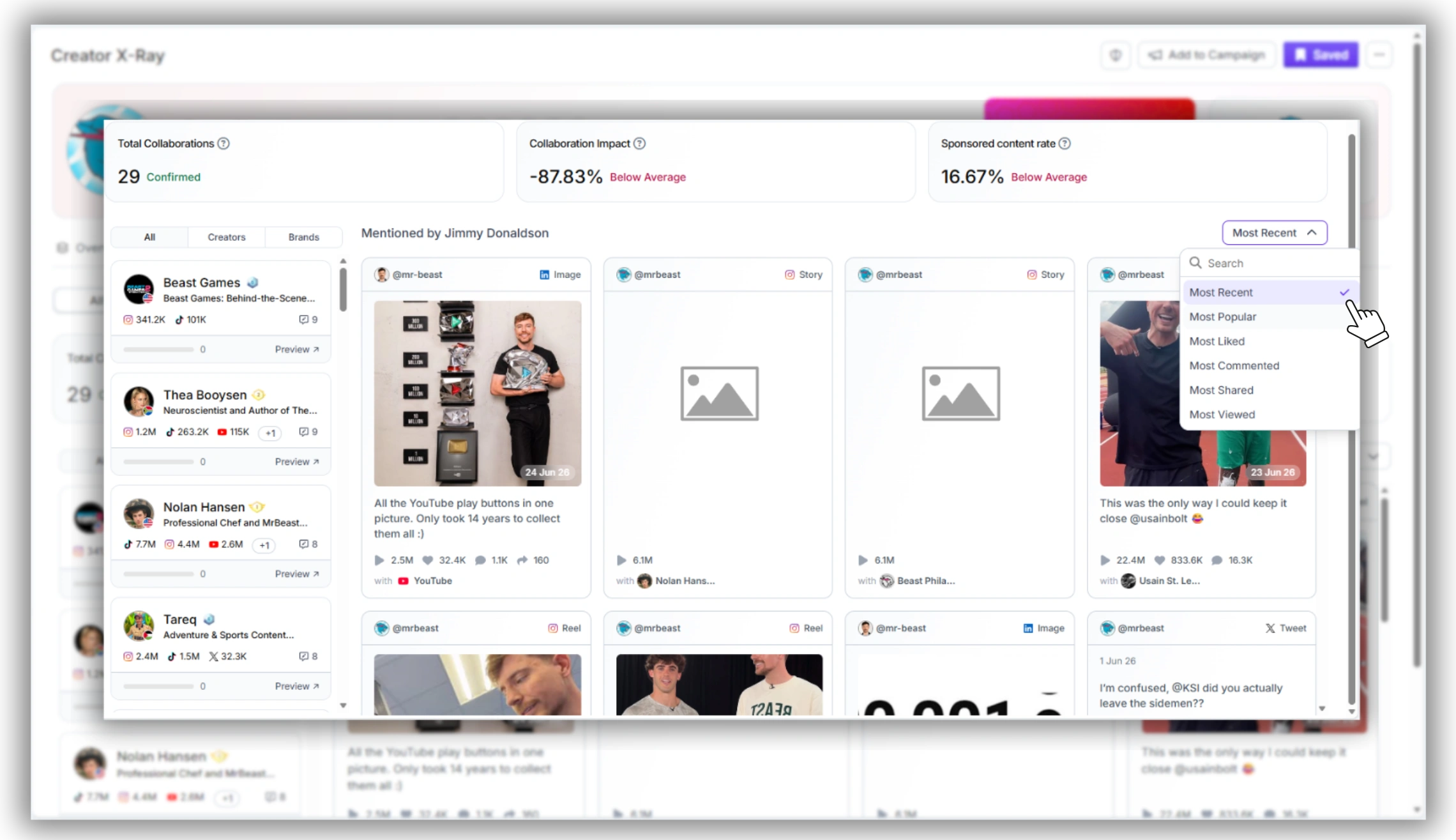
5. Scan the brand list: which brands appear repeatedly? Repeat appearances indicate an ongoing ambassador relationship, not a one-off post.
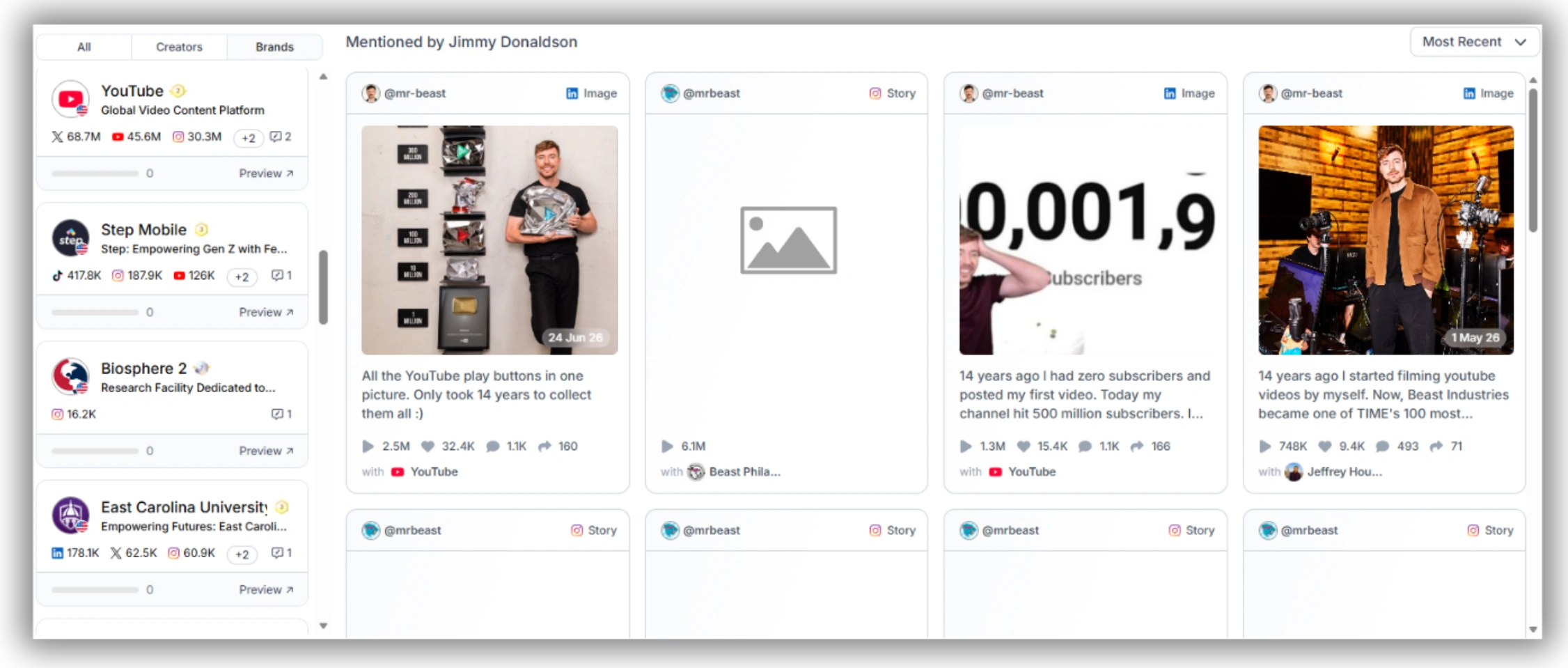
6. Check the date of the most recent collaboration. A creator with their last brand deal 8+ months ago may have changed their content focus or had partnerships fall through — worth investigating before you commit.
The competitive intelligence angle: run this search on a brand, not a creator
Favikon’s Collaborations data works in both directions. Search for a brand account instead of a creator, and you can see which creators they’ve worked with — the full roster of influencers a competitor brand has run campaigns with, in order of recency and engagement. No manual method on Instagram offers this.
Use this to: identify which creators your competitors are already activating, spot creators who have worked with competing brands (and decide whether that’s a conflict or an opportunity), and find the talent your rivals are betting on before you commit to a different roster.
4. What to Look for Once You Have the Data
Pulling the deal history is the first step. Knowing what signals matter is the second. Four things to assess:
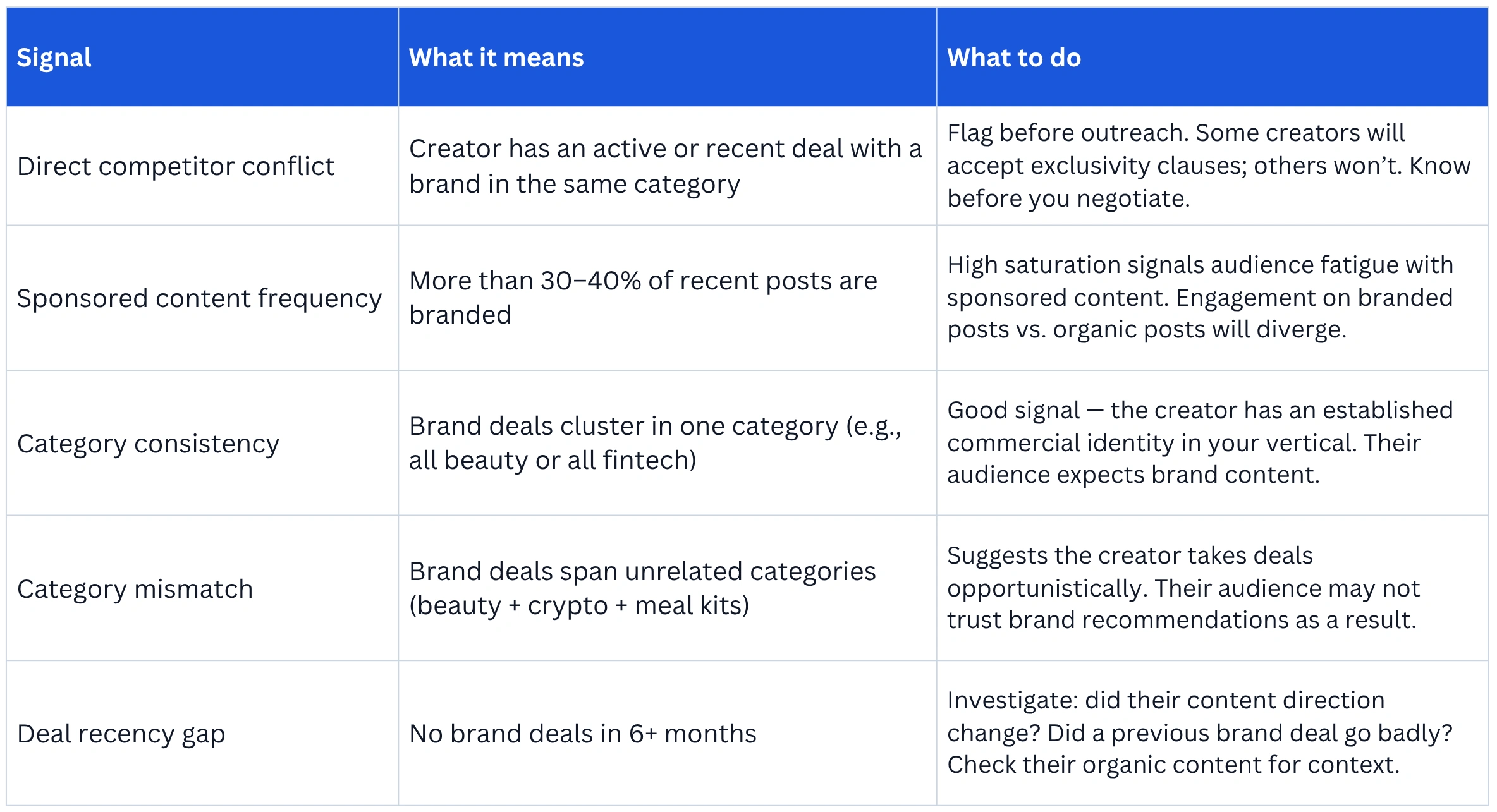
For a full pre-campaign vetting checklist that combines deal history, audience demographics, and engagement quality, see: influencer vetting process.
Running this process across multiple candidates? Favikon’s influencer analytics lets you pull Collaborations data, audience demographics, and engagement quality on each creator in one dashboard — without switching between profile tabs. Start free →
Frequently Asked Questions
Q: How do I see an influencer’s past brand collaborations?
A: Three methods: (1) Search their Instagram profile for #ad, #sponsored, and #partner hashtags. (2) Check their Tagged tab for posts where brands have tagged them in campaign content. (3) Use Favikon’s Collaborations tab, which aggregates brand deal history from across their content — filterable by recency and performance. The Collaborations tab is the most complete method and the only one that surfaces deals the creator didn’t explicitly disclose.
Q: Is there a way to check if an influencer has worked with my competitors?
A: Yes. In Favikon’s Collaborations tab, you can see the full list of brands a creator has worked with, ordered by recency. You can also search by brand account (rather than creator) to see which creators a competitor has activated. There’s no equivalent manual method on Instagram. A quick check before outreach prevents negotiating with a creator who’s already under an exclusivity clause with a competing brand.
Q: How do I know if an influencer posts too much sponsored content?
A: Check the ratio of sponsored to organic posts across their last 30 days. A useful benchmark: if more than 30–40% of recent posts are branded, the creator’s audience is likely experiencing sponsor fatigue. On Favikon, you can compare engagement rates on collaborative posts vs. organic posts — a significant gap (organic getting 2x or more the engagement of branded content) is the clearest signal that sponsored content is underperforming with their audience.
Also See 👀
➡️ HOW TO FIND TRENDING YOUTUBE TOPICS
➡️ HOW TO MEASURE INFLUENCER MARKETING ROI
➡️ FAVIKON INFLUENCER DATABASE — 10M+ PROFILES
Others articles